











Download for Windows
View an ad to download for free
Migrate SharePoint Sites, Lists, Libraries, and Documents Between Microsoft 365 Tenants Without
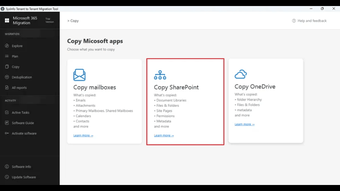
SysInfo SharePoint Migration Tool is a professional solution designed to simplify SharePoint Online migration between Microsoft 365 tenants. Whether you are consolidating business environments, restructuring organizations, or moving data after a merger, the software helps transfer SharePoint sites, document libraries, lists, folders, and documents while preserving their original hierarchy and metadata.
The software eliminates the complexity of manual SharePoint migration by providing an intuitive interface suitable for both IT administrators and business users. It supports bulk migration, allowing organizations to move multiple SharePoint sites simultaneously, reducing migration time and administrative effort.
With advanced migration technology, the tool maintains document structure, permissions, metadata, timestamps, and folder hierarchy throughout the migration process. This ensures that users can continue working with their SharePoint data after migration without worrying about missing files or damaged structures.
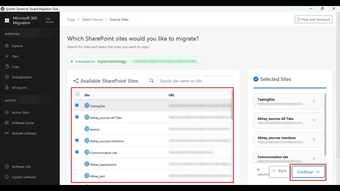
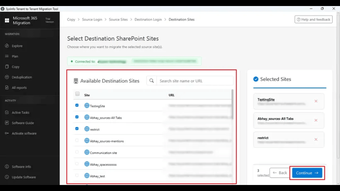
One of the major advantages of the software is its selective migration capability. Users can choose specific SharePoint sites, document libraries, or lists instead of migrating the entire tenant. Built-in filters help migrate only the required data, saving bandwidth, storage, and migration time.
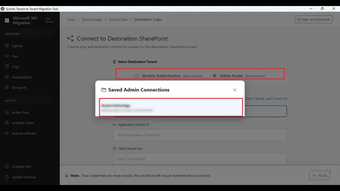
The application also supports CSV-based mapping, making it easy to match source and destination SharePoint sites during large enterprise migrations. This feature is especially valuable for organizations managing hundreds of SharePoint sites.
For business continuity, the software includes advanced migration controls such as Stop, Resume, Retry, Delta Migration, and Re-run Migration. These options help complete interrupted migrations efficiently while ensuring that only newly added or modified content is transferred during subsequent runs.
A real-time dashboard enables administrators to monitor migration progress, view completed tasks, identify failed items, and analyze migration status instantly. After completion, the software generates detailed migration reports that can be used for auditing, troubleshooting, and compliance documentation.
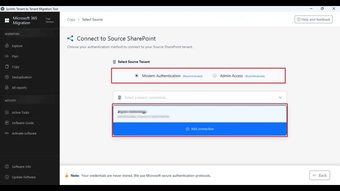
Security remains a priority throughout the migration process. The tool establishes secure authentication with Microsoft 365 accounts and transfers SharePoint content without modifying the original source data. Data integrity is maintained during every stage of migration.
Key Features
• Migrate SharePoint Online sites between Microsoft 365 tenants• Transfer document libraries, lists, folders, and files securely• Preserve metadata, permissions, timestamps, and folder hierarchy• Bulk migration for multiple SharePoint sites• Selective migration using advanced filters• CSV-based source and destination site mapping• Delta Migration for newly added content• Stop, Resume, Retry, and Re-run migration options• Real-time migration dashboard and progress monitoring• Detailed migration reports for auditing and compliance• User-friendly interface suitable for technical and non-technical users• Supports modern Microsoft 365 and SharePoint Online environments
SysInfo SharePoint Migration Tool is an ideal choice for IT teams, managed service providers, enterprises, educational institutions, and government organizations looking for a reliable SharePoint migration solution. It helps reduce migration complexity, minimize downtime, and ensure secure transfer of SharePoint content while maintaining complete data integrity.
Loading…
.png)
.png)
App specs
License
Demo
Version
26.0.7
Latest update
Platform
Windows
OS
Windows NT
Language
English
Size
211.03 MB
Developer
- SysInfoTools
- More programs (12)
Download for PC
View an ad to download for free
User reviews about SysInfo SharePoint to SharePoint Migration
Have you tried SysInfo SharePoint to SharePoint Migration? Be the first to leave your opinion!
Add reviewTop downloads Utilities & Tools for Windows
Top downloads Utilities & Tools for Windows
Top downloads Utilities & Tools for Windows
Related topics about SysInfo SharePoint to SharePoint Migration
Latest articles

Fortnite gets Spider-Man: Brand New Day crossover: Web Shooters are back

EverQuest Legends is out now: servers open today after strong demand

Pokémon Pokopia gets Bubbly Basin on August 5: free Dive update too

Aliens: Fireteam Elite 2 reveals the Machinist: a support class built for co-op

NBA 2K27 gameplay trailer is out: new Dunk Meter and September 4 release date
Laws concerning the use of this software vary from country to country. We do not encourage or condone the use of this program if it is in violation of these laws. Softonic may receive a referral fee if you click or buy any of the products featured here.